15 min to read
After the Alert: Did the Attacker Actually Get In? A SOC Investigation with Splunk
Follow one suspicious login from the first failed attempt to a clear, evidence-backed handoff
PLAYBOOK FLOW
Investigation path
- 1Understand the alert
- 2Check the available evidence
- 3Verify the successful login
- 4Follow the right session
- 5Test another explanation
- 6Write the handoff
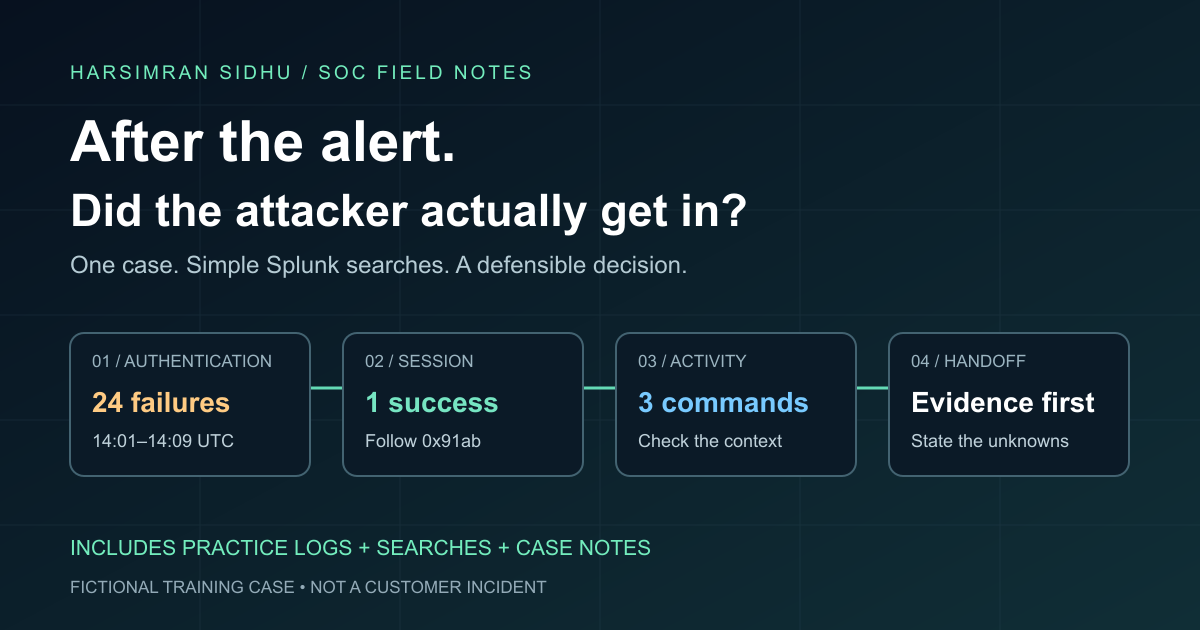
Twenty-four failed logins. Then a successful one.
It is tempting to write “brute force successful” and escalate. But that skips the important part: what does the evidence actually prove?
A successful login tells us a session was created. It does not tell us who was behind the keyboard, whether the earlier failures caused the success, or what happened afterward.
This post follows that gap. We will use a small Splunk investigation to move from an alert to a decision someone else can understand and act on.
About this case: this is a fictional training scenario, not a customer incident or a claim about work I performed. Every record and case note below is synthetic. The CSV contains simplified, normalized teaching records—not raw Windows exports. The public IP is a documentation placeholder, not an indicator to block. All times are UTC.
If you are still finding your way around Splunk, start with Your First SOC Investigation in Splunk. That guide covers indexes, sourcetypes, and reading your first event. Here, we continue its fictional ticket and add follow-on evidence.
Choose your path: read straight through for the investigation, or download the searches and follow along in your own lab. You only need basic search access and permission to upload a lookup—not a live attack or a production endpoint.
1. Read the ticket before writing a search
At 14:11 UTC on September 3, 2026, ticket SOC-2026-0903-017 arrives:
| Alert field | Value |
|---|---|
| Account | LAB\alex.morgan |
| Destination | FIN-WS-07 |
| Reported source | 198.51.100.44 |
| Failed attempts | 24, between 14:01 and 14:09 |
| Subsequent success | 14:10:32 |
| Detection description | Repeated failed logins followed by a success |
Treat those as claims to verify, not the finished investigation.
Three questions give the case direction:
- Did the failures and success involve the same account, destination, and reported source?
- What kind of session succeeded, and what activity belongs to it?
- Is there a reasonable authorized explanation?
The answers determine whether we close, investigate further, or escalate. A reputation lookup alone cannot answer them.
2. Know what you can search
In a real environment, first confirm where authentication and endpoint logs live. Check their time coverage and read a raw sample. Ask whether command-line auditing is enabled and whether the host was reporting during the incident.
For this exercise, we have:
| Evidence | What it helps answer | Limitation |
|---|---|---|
| Synthetic authentication records | Which login attempts failed or succeeded? | No proof of the human identity |
| Synthetic process records | What ran under the selected session? | Not a full endpoint history |
| Fictional analyst follow-up notes | Was the activity expected? | Context to assess, not machine telemetry |
We do not have packet capture, file-access auditing, a complete network inventory, or a full historical baseline. Keep those gaps in view.
Load the practice file
Download the 30-record practice CSV.
In an authorized Splunk lab, add it as a lookup table file in the Search & Reporting app, using the filename soc-login-case.csv. This is normally under Settings → Lookups → Lookup table files → Add new. If you cannot see that option, ask your administrator; you do not need production ingestion privileges for this exercise.
Run:
| inputlookup soc-login-case.csv
| head 5
You should see columns such as timestamp, host, event_code, and logon_id. Open Statistics if the table is not immediately visible.
inputlookup reads a lookup file, not an index. The usual time picker does not automatically filter these rows. The first investigative search below explicitly parses and filters the timestamps. Splunk inputlookup reference.
The lab uses alex.morgan without a domain because it contains only one identity domain. In production, preserve the domain or SID to avoid merging different accounts.
If your results do not match
| Symptom | Check this first |
|---|---|
| Lookup file not found | Confirm the exact filename, current app, and lookup permissions. |
| Everything appears in one column | Upload the original CSV, not a spreadsheet-exported or reformatted copy. |
| The first search works but the time-filtered search is empty | Check that timestamp still includes its +0000 offset and matches the format passed to strptime. |
| Changing the time picker has no effect | This is a lookup exercise. Its rows need an explicit time filter. |
| No process records in a real investigation | Check collection coverage and field mapping before concluding that nothing ran. |
Work backward one filter at a time. Keep the original search saved so you can explain what you changed.
3. Verify the failures and the success
Start with the account and destination, without filtering to the suspicious IP. That leaves room to notice other sessions.
| inputlookup soc-login-case.csv
| eval _time=strptime(timestamp,"%Y-%m-%dT%H:%M:%S%z")
| where _time>=strptime("2026-09-03T14:00:00+0000","%Y-%m-%dT%H:%M:%S%z")
    AND _time<strptime("2026-09-03T14:20:00+0000","%Y-%m-%dT%H:%M:%S%z")
| search source_type=windows_security host="FIN-WS-07" user="alex.morgan"
| stats count AS events earliest(timestamp) AS first_utc latest(timestamp) AS last_utc
    BY src_ip event_code logon_type
| sort 0 src_ip event_code
Expected groups:
| Source | Event | Logon type | Count | First → last, UTC |
|---|---|---|---|---|
| 198.51.100.44 | 4625 | 10 | 24 | 14:01:00 → 14:09:00 |
| 198.51.100.44 | 4624 | 10 | 1 | 14:10:32 |
| 10.20.30.15 | 4624 | 3 | 1 | 14:10:45 |
The output also shows the full date and offset. earliest and latest select the timestamp values using the parsed _time. Later searches sort the fixture’s identically formatted UTC strings; do not use string ordering for mixed timestamp formats.
The alert’s counts check out. But there is also a second successful session.
One missing detail matters: why did the attempts fail? On real 4625 events, inspect Status, SubStatus, and the failure reason. A locked account and an incorrect password are not the same explanation. This fixture omits those fields, so we cannot call all 24 failures bad-password attempts. Microsoft event 4625 reference.
Microsoft documents 4624 as a successful logon session on the destination computer. Type 10 is remote interactive, associated with Remote Desktop/Terminal Services; type 3 is a network logon. They are not interchangeable. Microsoft event 4624 reference.
What we know: the suspicious source has failures followed by a remote-interactive success.
What we do not know: whether someone guessed a password, already had valid credentials, or was an authorized user having trouble signing in. A shared egress address could also represent different clients.
That is why the next step is a session pivot—not an immediate verdict.
4. Get the session identifier
Open the successful records:
| inputlookup soc-login-case.csv
| search source_type=windows_security host="FIN-WS-07"
    user="alex.morgan" event_code=4624
| sort 0 timestamp
| table event_id timestamp src_ip logon_type logon_id
There are two results:
- A25: 14:10:32, source
198.51.100.44, type 10, session0x91ab. - B01: 14:10:45, source
10.20.30.15, type 3, session0x77cd.
We will follow 0x91ab on FIN-WS-07, within this short time window.
The remaining lab searches operate on this fixed, single-window fixture. On live data, keep an explicit incident time range on every search.
A field-mapping detail worth getting right
In this CSV, logon_id is already normalized. Real Windows events have different subject and target fields.
For a 4624 event, identify the newly created session’s TargetLogonId. For a 4688 process event, inspect the creator and, where present, target security context before deciding which account/session the process ran under. Do not blindly rename every SubjectLogonId to the same field. Our fixture assumes creator and execution identity match. Command lines also require the relevant audit configuration. Microsoft event 4688 reference.
Use the destination computer, identity, time, and session together. A logon ID is not a globally unique identifier across your fleet; check reboot boundaries and the raw records before trusting a long-range match.
5. Find what ran in that session
| inputlookup soc-login-case.csv
| search source_type=windows_process host="FIN-WS-07"
    user="alex.morgan" logon_id="0x91ab"
| sort 0 timestamp
| table event_id timestamp host logon_id command
Expected results:
| Record | Time, UTC | Command |
|---|---|---|
| P01 | 14:11:04 | whoami /all |
| P02 | 14:11:19 | hostname |
| P03 | 14:11:42 | net group "Domain Admins" /domain |
These commands inspect identity, the host name, and domain-group membership. They are useful to an intruder—and also to administrators.
More precisely, these records show the commands were launched with those arguments. They do not contain command output or exit status. We cannot tell whether the domain-group query succeeded or returned useful information.
The commands alone are not a malware verdict. Their value here is that they belong to the session we are investigating, immediately after the suspicious login.
Notice what is absent: the inventory executable from session 0x77cd. A username-only search would mix it into the same story.
Try removing the logon_id filter. You will get a fourth process record, B02, at 14:12:00. Its name is not proof that it is safe; it is simply not linked to our selected session. Investigate it separately if other evidence warrants that.
6. Test the authorized-user explanation
At this point, the right question is not “How do I prove this is an attacker?” It is “What evidence would change my mind?”
For the training scenario, the analyst receives these fictional follow-up notes:
| Time, UTC | Follow-up | Result |
|---|---|---|
| 14:18 | Contact Alex using the established corporate directory number | Alex denies initiating the remote session or running these commands |
| 14:21 | Ask the asset owner about scheduled administration on FIN-WS-07 | No approved task identified for that window |
| 14:23 | Request a source-to-device mapping from the network team | Still pending; source ownership is not established |
These notes are supplied scenario context, not facts extracted by SPL. In a real case, record who supplied them, how you verified their identity, and the ticket/evidence reference.
User denial and the absence of a known task increase concern, but neither identifies the actor. Missing a change ticket is not definitive proof of unauthorized activity.
Together, we now have:
- Repeated failures followed by a successful remote-interactive session.
- Discovery commands associated with that session.
- A verified user contact denying the activity.
- No authorized explanation identified so far.
That supports escalating suspected unauthorized access. It does not prove how the credentials were obtained, that the earlier failures caused the success, or that data was stolen.
7. Make one timeline, not a pile of screenshots
This search brings the suspicious source’s authentication and the selected session’s process activity together:
| inputlookup soc-login-case.csv
| search host="FIN-WS-07" user="alex.morgan"
| where (source_type="windows_security" AND src_ip="198.51.100.44")
    OR (source_type="windows_process" AND logon_id="0x91ab")
| sort 0 timestamp
| table event_id timestamp source_type event_code src_ip logon_id command
You should get 28 rows: 24 failures, one success, and three process records. Neither B01 nor B02 belongs in this selected timeline.
For the ticket, summarize the repeated failures into one line, but retain their record references. Add the separately sourced follow-up notes after the machine events.
In production, preserve the original records, search text, time range, and evidence location according to your team’s handling rules. A table is an explanation of evidence, not a substitute for it.
8. Write the decision so the next analyst can act
Here is the completed handoff for our fictional case:
SOC-2026-0903-017 — suspected unauthorized remote access
Observed: On 2026-09-03, FIN-WS-07 recorded 24 failed logins for LAB\alex.morgan from the reported source 198.51.100.44 between 14:01 and 14:09 UTC (A01–A24). A remote-interactive success followed at 14:10:32, creating session 0x91ab (A25). Three process records tied to that host/session show identity, host, and domain-group discovery between 14:11:04 and 14:11:42 (P01–P03).
Context: At 14:18, the user denied the activity through a verified contact route. At 14:21, the asset owner reported no approved task identified. Source-to-device mapping remains pending.
Assessment: Suspected unauthorized use of the account; escalate for incident response. Successful access is observed, but attribution and the credential-acquisition method are not established.
Scope and gaps: This fixture covers one host and a short window. No claim of exfiltration, persistence, or absence of lateral movement can be made from these records.
Requested next actions: The incident lead should assess account/session containment and endpoint isolation under the response playbook, considering business impact and evidence preservation. Expand searches for the account and reported source across available hosts and identity/network logs; obtain the pending source mapping.
Status: Escalation recommended. No containment action is represented as completed in this exercise.
“Block the IP and close” would not resolve the uncertainty. Nor would a password reset, by itself, prove every active session or foothold had been removed. Assign response actions to the right owner and verify their result.
9. Improve the alert without hiding the next incident
The first alert was useful. Its weakness was that it left the analyst to reconstruct the session and context.
A practical improvement is to enrich the ticket with the successful session ID, logon type, destination, and linked follow-on activity.
Do not suppress everything from a familiar VPN address. Do not require process telemetry for the base alert to fire: collection gaps would become blind spots.
Before deploying a change, test at least these cases:
| Test | Expected behavior |
|---|---|
| This case: failures, success, discovery activity | Keep the alert and attach the selected session’s activity |
| Same username, different session | Do not attribute that session’s processes to the suspicious login |
| Failures without a success | Do not label access successful; retain appropriate failed-login detection |
| Success with missing process logs | Keep the authentication evidence and explicitly flag the gap |
| Authorized maintenance with similar commands | Present the context for review, not an automatic compromise verdict |
| Same logon ID on another host | Do not merge sessions across hosts |
Only the first two are illustrated by the supplied dataset. The others are additional test cases to build, not tests this post claims to have passed. This is an investigation lab, not a production-ready correlation rule.
Practice it before reading the answers again
Try answering these in a clean search tab:
- How many authentication records are in the file?
- Which successful session belongs to the alert’s reported source?
- What gets incorrectly included if you filter processes only by username and host?
- What remains unknown even after you have the correct timeline?
Check your answers
- 26 authentication records: 24 failures and two successes.
- Session
0x91abonFIN-WS-07. - B02, the process from the separate session
0x77cd. - The actor, credential-acquisition method, full scope, and any data access or loss are still unresolved.
Take the method back to your own logs
Do not just replace inputlookup with index=windows and expect the lab fields to exist. Before adapting a search:
- Find one real event. Use the index and sourcetype your team actually collects, within an explicit incident time window.
- Map the fields. Confirm the destination computer, account/domain or SID, source address, event code, and subject/target session fields in the original record. Splunk’s
hostmetadata may identify a collector rather than the affected endpoint. - Check the time. Verify event timestamps and the search timezone against the alert. Check for delayed collection or clock differences before joining a timeline.
- Validate one match manually. Open the successful login and a candidate process record side by side before summarizing hundreds of events.
- Expand deliberately. Search other destinations for the identity and source, then inspect process ancestry and available network/file evidence. Record which sources and periods you actually checked.
If a key field is missing, write down the gap and request the relevant telemetry. A blank result is a reason to check coverage—not evidence that the host is clean.
Download the searches, lab notes, and blank case-note template to work through it yourself.
The habit to take away is simple: every search should answer a question, and every conclusion should point back to evidence.
You do not need the most complicated SPL in the room. You need a clear path from “this alert fired” to “this is what we know, this is what we do not know, and this is what should happen next.”